Tech Stack: 2026

Components of modern web applications

When it comes to software architecture, there’s never a single solution that’s always applicable. The answer to “what technologies should I use?” is always “it depends.” It depends on what problem you’re trying to solve, the size of your team, how mission-critical it is and how reliable it needs to be, what scale of usage you’re looking at, and plenty of other factors. But there are some general principles to apply and some very common situations where we can get more into specifics if we narrow our focus.

At JetBridge we’ve built dozens of applications, for clients and sometimes launched our own products as well. We’ve done everything from synthetic biology visualization to ad retargeting, from emergency radio IoT monitors to advanced telephony. In nearly every case though, we’ve been building database-backed web applications with some of web frontend. Not every software project is this, but nearly everything we’ve encountered has been something pretty close. So let’s talk about our preferred architectural components, drawing on our extensive experience and hard-won lessons from deploying profit-making applications in the real world.

In short: vibe-friendly, cloud-native serverless applications with great observability and data integrity.

Vibe-friendly

Creating software in 2026 is a fundamentally different paradigm than even a year ago. When Claude Opus 4.5 came out at the end of 2025, there was a real industrywide vibe shift. Some of the most fastidious, conscientious engineers I know are not really writing code line by line anymore. They have multiple agents going and are spending their time refining their skills and commands, spending more time on testing and reviewing their greatly increased output, and busting out entire applications in their spare time with barely lifting a finger. It can even be addictive, prompting Claude Code with your fantasies about extensive test coverage or wacky UIs or great migrations from one framework to another. Maybe part of the addiction is the slot machine effect; getting a random reward when it actually does exactly what you wanted, which is becoming more frequent compared to even a few months ago.

What does this have to do with your tech stack? Popular technologies that are well-documented, mature, and ideally somewhat static, have an even greater attractiveness than before. It’s true that not everyone chooses their technologies purely by popularity, but I believe for most pragmatic-minded engineers it is an important factor. How easy is it to hire someone who already understands the technology? How many edge cases has it hit and solved for? How good are the docs? Is there a community of people who can answer your questions or respond to your PRs?

These have always been important questions when choosing a technology, but it hasn’t stopped many companies from adopting slightly less popular technologies for various practical or ideological reasons. Vue instead of React, Scala instead of Java, hell even a few places run some FreeBSD. If we only went with the most widespread technologies we’d all be writing WordPress plugins.

LLMs theoretically have most software documentation in their training sets, but they sure hallucinate a lot more for technologies that don’t have oodles of example code and stable documentation. Agents are not bad at combing GitHub issues or StackOverflow posts when you run into issues. Also, when libraries have a major change in how they between versions, work, LLMs often will write code in the old style, for example writing SQLAlchemy 1-style code even though they have a new style in version 2. Regarding making LLMs RTFM, you can always feed in migration guides which can help a lot in some cases, but I recommend hooking up a MCP tool like Context7 which knows how to fetch docs for all sorts of languages.

Another thing to consider is strict well-typed languages or configurations. I’m talking about TypeScript as the default case for your backend and frontend with all strict mode options and authoritarian style eslint rulesets. It’s great for strong typing, the ecosystem has really matured in a big way the last few years, has terrific tooling, is getting way faster to compile, lets your agents keep more coherent context about your entire application, and you probably need to use it for your frontend anyway. Make your agent crank out a ton of strict CI checks and linting and formatting.

For lower-level projects, Rust is strongly worth considering because the compiler is absolutely amazing at enforcing safe practices and gives you so much useful hints at compile-time. It gives the kind of feedback that really forces agents into writing robust and well-structured and safe code. It may not be the most readable code however unless you’re already pretty handy with Rust syntax, because it comes close to Perl in its range of syntactic punctuation.

Language

If your application has a web frontend then you pretty much have no choice except TypeScript for it. If part of your application is in TypeScript, it usually makes sense to default the backend to TypeScript as well to share one set of tooling, CI, types, and orchestrate it all in a monorepo. There can be great reasons to have your backend in a different language, probably the most common reason being if your application is heavy on data science, then Python is likely the only reasonable option there.

The JS-derivative community including Node, Deno, TypeScript, Bun, etc has really matured in recent years. It was something of a wild west five or ten years ago but the quality of tooling and libraries has evolved a great deal and become mature and stable enough to build software on top of and enjoy it too. Plenty of the important build and linting tools have cores written in Rust or Go now for improving development speed, such as esbuild, TypeScript, biome, vite, and turbopack.

Cloud-native

We’ve been writing about cloud-native application architecture for a decade. The brief version is: you shouldn’t be focusing on the operational details of solved problems.

Your time and resources should be focused on whatever you’re doing that is unique and delivering value to someone. Applying patches to a webserver, configuring iptables, setting up your own monitoring system from scratch, customizing OSes, and coming up with server naming schemes are probably not tasks which differentiate your organization from others. AWS can do a better job of setting up highly available systems and managing storage and transit than you can. Take advantage of their vast offering of managed services and focus on your product.

What cloud provider to use depends on what your org is already using generally, but if you’re starting out, I recommend AWS because it’s been around the longest and is still the clear leader in market share.

Serverless

Serverless means different things to different people but generally it’s a philosophy of focusing on differentiated logic and features that deliver value for you and your customers. It doesn’t mean there are no servers, of course your code is running somewhere. It means you probably shouldn’t be concerning yourself with where it’s running or managing pets. You shouldn’t know IP addresses or hostnames generally speaking. I like Lambda and Fargate because they epitomize the concept of “here’s my code just run it somewhere I don’t care where.” Kubernetes is a great choice if you have some really custom or specialized uncommon setup, of if you happen to be Google, but if you’re running a database-backed web application, you need Kubernetes like an English major college student needs a supercomputer cluster.

One of the biggest challenges withe cloud-native serverless development is having a local development environment. If you’re writing mostly lambda functions, you want to do your testing in an environment where all of your cloud resources are present but with rapid iteration. Our go-to tool for this for many years has been a fantastic open-source project called Serverless Stack.

Serverless Stack

It’s not a huge framework of its own or anything, it’s some really focused useful tools on top of existing technology that provide some killer features. In a nutshell it’s for defining infrastructure-as-code with Pulumi, but you get tight integration of your cloud resources (e.g. queues, databases, S3 buckets, functions) with your runtime code, super fast and easy deployments, integrated monitoring, and live local lambda development. It’s what AWS SAM should be but isn’t. We’ve made so many apps with this tool and love it.

When you set up your new project, include “Use SST v3” in your prompt.

Observability

Hopefully I don’t need to sell anyone on the importance of observability, also known as knowing when your stuff breaks, but it’s something we’ve taken particular pride in when building applications. I love to create custom CloudWatch dashboards connected to the important cloud resources like Aurora serverless capacity, or API Gateway 5xx errors, or DLQ stats, but also custom application-level metrics.

If you use Serverless Stack, it has a super handy console where any errors your functions throw show up, and you can have it alert you by email or slack notification. It’s super super useful.

I highly recommend the AWS Lambda Powertools libraries. They have fantastic features for building middleware stacks, emitting custom metrics, distributed tracing, structured logging, type definitions for AWS events, idempotency helpers, and new features coming out every month it seems.

Another great MCP tool is the Sentry MCP tool, and AWS has a whole suite of them but connecting to CloudWatch is super handy. These can supercharge your agent when debugging issues. I also recommend the AWS Cost Explorer MCP tool for having agents optimize your cloud spend.

Putting It Together

If you’re looking to build a new database-backed web application and want to use modern but dependable and mature technologies, here’s a list of our favorite packages. Paste this into your agent to start a new project:

Our choices are based partly on what’s worked great for us over many projects and partly on popularity and ubiquity. They combine nicely to enable rapid, type-safe development (Next.js, tRPC, Vitest) and an unparalleled local development experience for cloud-native applications (SST).

Prisma is a very strong ORM option as well but it does tend to have considerable overhead and constraints, and much of the time a simpler query builder like Drizzle will do just fine.

Next.js is really just the industry standard now, and extremely mature and covers any sort of use case you’re going to want to handle in your web application. Open-next is used to deploy your application natively to AWS and is a tool JetBridge has contributed to.

This is our favorite setup in 2026, both for the type-safe end-to-end structure as well as the combination of maturity and modernity these tools have. It’s not the right setup for every project but it’s our recommended default starting point. Have some fun with it.
Multipart-Encoded and Python Requests

It’s easy to find on the web many examples of how to send multipart-encoded data like images/files using python requests. Even in request’s documentation there’s a section only for that. But I struggled a couple days ago about the Content-type header.

The recommended header for multipart-encoded files/images is multipart/form-data and requests already set it for us automatically, using the parameter “files”. Here’s an example taken from requests documentation:

>>> url = 'https://httpbin.org/post'
>>> files = {'file': open('report.xls', 'rb')}

>>> r = requests.post(url, files=files)
>>> r.text
{
  ...
  "files": {
    "file": "<censored...binary...data>"
  },
  ...
}

As you can see, you don’t even need to set the header. Moving on, we often need custom headers, like x-api-key or something else. So, we’d have:

>>> headers = {'x-auth-api-key': <SOME_TOKEN>, 'Content-type': 'multipart/form-data'}
>>> url = 'https://httpbin.org/post'
>>> files = {'file': open('report.xls', 'rb')}

>>> r = requests.post(url, files=files, headers=headers)
>>> r.text
{
  ...
  "files": {
    "file": "<censored...binary...data>"
  },
  ...
}

Right? Unfortunately, not. Most likely that you will receive an error like below:

ValueError: Invalid boundary in multipart form: b'' 

or

{'detail': 'Multipart form parse error - Invalid boundary in multipart: None'}

Or even from a simple Nodejs server, because it’s not a matter of language or framework. In the case of the NodeJs server, you will get an undefined in request.files because is not set.

So, what’s the catch?

The catch here is even when we need custom headers, we don’t need to set the 'Content-type': 'multipart/form-data', because otherwise requests won’t do its magic for us setting the boundary field.

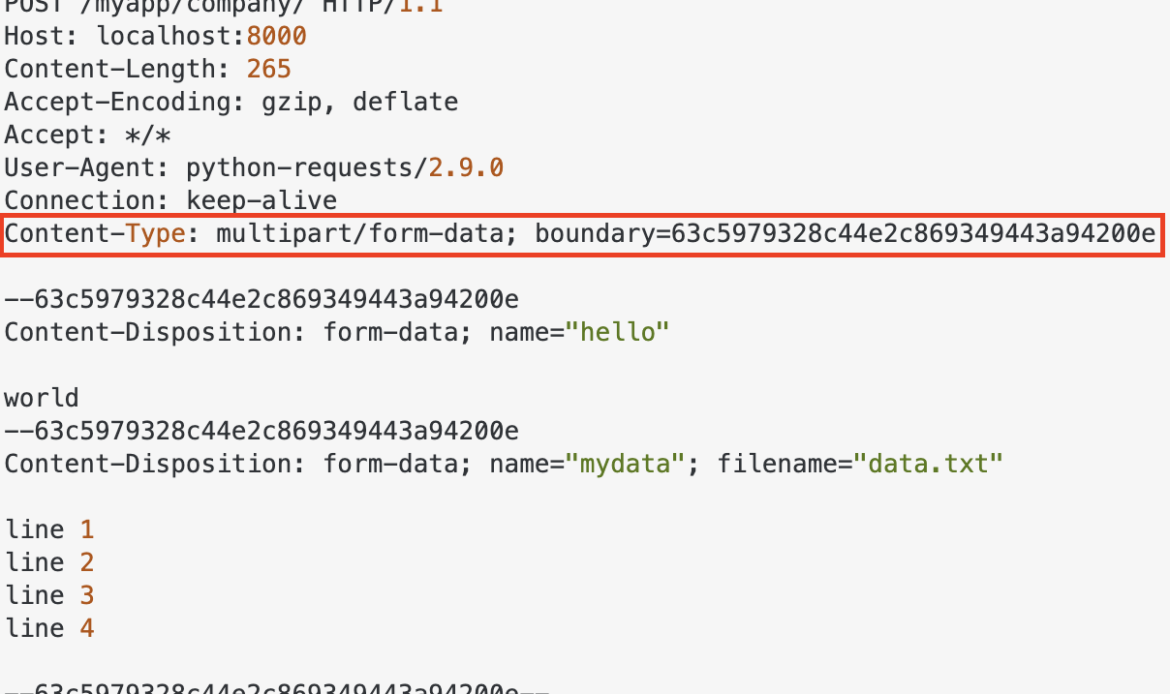
For multipart entities the boundary directive is required, which consists of 1 to 70 characters from a set of characters known to be very robust through email gateways, and not ending with white space. It is used to encapsulate the boundaries of the multiple parts of the message. Often, the header boundary is prepended with two dashes and the final boundary has two dashes appended at the end. (source)

Here’s an example of a request containing multipart/form-data:

Example of a request containing multipart/form-data

So, there it is. When using requests to POST file and/or images, use the files param and “forget” the Content-type, because the library will handle it for you.

Nice, huh? 😄
Not when I was suffering. 😒

Building a REST API with Django REST Framework

Let’s talk about a very powerful library to build APIs: the Django Rest Framework, or just DRF!

DRF logo

With DRF it is possible to combine Python and Django in a flexible manner to develop web APIs in a very simple and fast way.

Some reasons to use DRF:

  • Serialization of objects from ORM sources (databases) and non-ORM (classes).
  • Extensive documentation and large community.
  • It provides a navigable interface to debug its API.
  • Various authentication strategies, including packages for OAuth1 and OAuth2.
  • Used by large corporations such as: Heroku, EventBrite, Mozilla and Red Hat.

And it uses our dear Django as a base!

That’s why it’s interesting that you already have some knowledge of Django.

Introduction

The best way of learning a new tool is by putting your hand in the code and making a small project.

For this post I decided to join two things I really like: code and investments!

So in this post we will develop an API for consulting a type of investment: Exchange Traded Funds, or just ETFs.

Do not know what it is? So here it goes:

An exchange traded fund (ETF) is a type of security that tracks an index, sector, commodity, or other asset, but which can be purchased or sold on a stock exchange the same as a regular stock. An ETF can be structured to track anything from the price of an individual commodity to a large and diverse collection of securities. ETFs can even be structured to track specific investment strategies. (Retrieved from: Investopedia)

That said, let’s start at the beginning: let’s create the base structure and configure the DRF.

Project Configuration

First, let’s start with the name: let’s call it ETFFinder.

So let’s go to the first steps:

# Create the folder and access it
mkdir etffinder && cd etffinder

# Create virtual environment with latests installed Python version
virtualenv venv --python=/usr/bin/python3.8

# Activate virtual environment
source venv/bin/activate

# Install Django and DRF
pip install django djangorestframework

So far, we:

  • Created the project folder;
  • Created a virtual environment;
  • Activated the virtual environment and install dependencies (Django and DRF)

To start a new project, let’s use Django’s startproject command:

django-admin startproject etffinder .

This will generate the base code needed to start a Django project.

Now, let’s create a new app to separate our API responsibilities.

Let’s call it api.

We use Django’s django-admin startapp command at the root of the project (where the manage.py file is located), like this:

python3 manage.py startapp api

Also, go ahead and create the initial database structure with:

python3 manage.py migrate

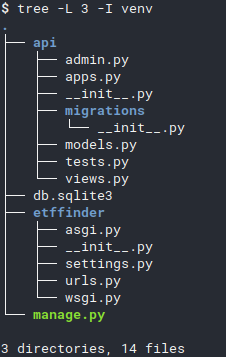
Now we have the following structure:

File structure
File structure

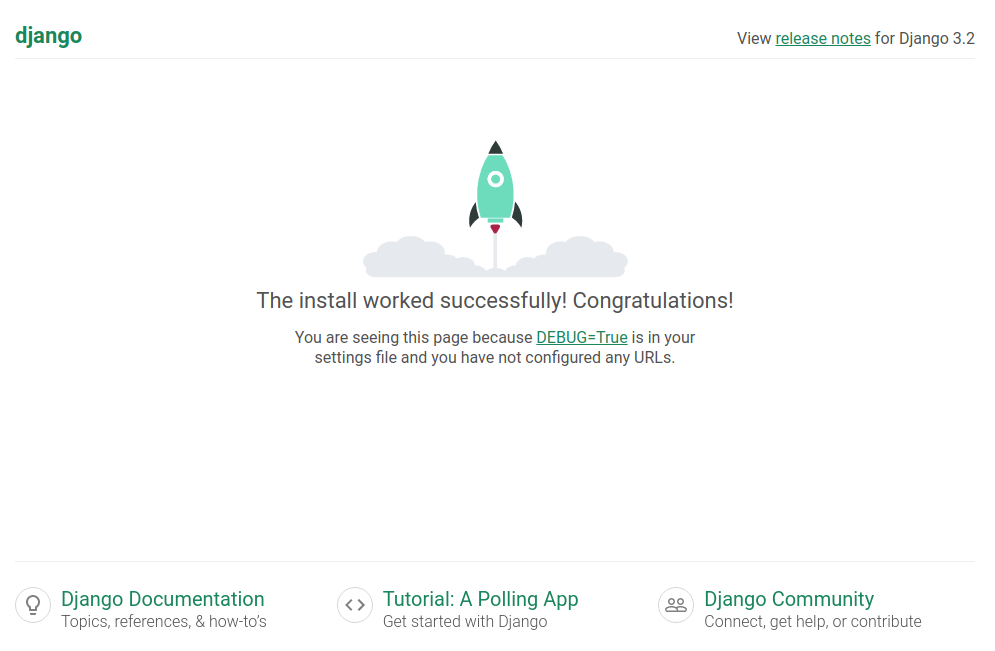
Run the local server to verify everything is correct:

python3 manage.py runserver

Access http://localhost:8000 in your browser ans you should see the following screen:

Default webpage
Django’s default webpage

Now add a superuser with the createsuperuser command (a password will be asked):

python manage.py createsuperuser --email admin@etffinder.com --username admin

There’s only one thing left to finish our project’s initial settings: add everything to settings.py.

To do this, open the etffinder/settings.py file and add the api, etffinder and rest_framework apps (required for DRF to work) to the INSTALLED_APPS setting, like this:

INSTALLED_APPS = [
    'django.contrib.admin',
    'django.contrib.auth',
    'django.contrib.contenttypes',
    'django.contrib.sessions',
    'django.contrib.messages',
    'django.contrib.staticfiles',
    'rest_framework',
    'etffinder',
    'api'
]

Well done!

With that we have the initial structure to finally start our project!

Modeling

The process of developing applications using the Django Rest Framework generally follows the following path:

  1. Modeling;
  2. Serializers;
  3. ViewSets;
  4. Routers

Let’s start with Modeling.

Well, as we are going to make a system for searching and listing ETFs, our modeling must reflect fields that make sense.

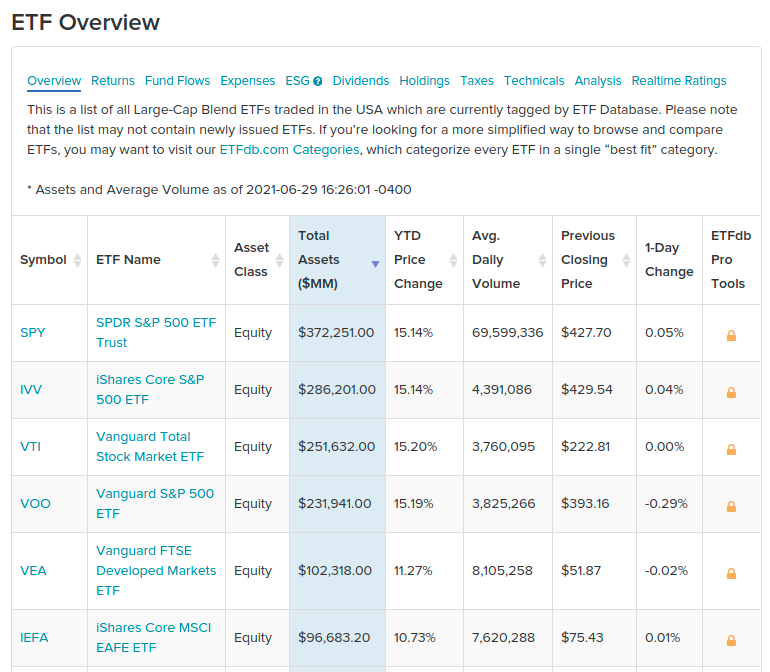
To help with this task, I chose some parameters from this Large-Cap ETF’s Table, from ETFDB website:

ETFDB table
ETFDB ETF table

Let’s use the following attributes:

  • Symbol: Fund identifier code.
  • Name: ETF name
  • Asset Class: ETF class.
  • Total Assets: Total amount of money managed by the fund.
  • YTD Price Change: Year-to-Date price change.
  • Avg. Daily Volume: Average daily traded volume.

With this in hand, we can create the modeling of the ExchangeTradedFund entity.

For this, we’ll use the great Django’s own ORM (Object-Relational Mapping).

Our modeling can be implemented as follows (api/models.py):

from django.db import models
import uuid


class ExchangeTradedFund(models.Model):
  id = models.UUIDField(
    primary_key=True,
    default=uuid.uuid4,
    null=False,
    blank=True)

  symbol = models.CharField(
    max_length=8,
    null=False,
    blank=False)

  name = models.CharField(
    max_length=50,
    null=False,
    blank=False)

  asset_class = models.CharField(
    max_length=30,
    null=False,
    blank=False)

  total_assets = models.DecimalField(
    null=False,
    blank=False,
    max_digits=14,
    decimal_places=2)

  ytd_price_change = models.DecimalField(
    null=False,
    blank=False,
    max_digits=5,
    decimal_places=2)

  average_daily_volume = models.IntegerField(
    null=False,
    blank=False)

With this, we need to generate the Migrations file to update the database.

We accomplish this with Django’s makemigrations command. Run:

python3 manage.py makemigrations api

Now let’s apply the migration to the Database with the migrate command. Run:

python3 manage.py migrate

With the modeling ready, we can move to Serializer!

Serializer

DRF serializers are essential components of the framework.

They serve to translate complex entities such as querysets and class instances into simple representations that can be used in web traffic such as JSON and XML and we name this process Serialization.

Serializers also serve to do the opposite way: Deserialization. This is done by transforming simple representations (like JSON and XML) into complex representations, instantiating objects, for example.

Let’s create the file where our API’s serializers will be.

Create a file called serializers.py inside the api/ folder.

DRF provides several types of serializers that we can use, such as:

  • BaseSerializer: Base class for building generic Serializers.
  • ModelSerializer: Helps the creation of model-based serializers.
  • HyperlinkedModelSerializer: Similar to ModelSerializer, however returns a link to represent the relationship between entities (ModelSerializer returns, by default, the id of the related entity).

Let’s use the ModelSerializer to build the serializer of the entity ExchangeTradedFund.

For that, we need to declare which model that serializer will operate on and which fields it should be concerned with.

A serializer can be implemented as follows:

from rest_framework import serializers
from api.models import ExchangeTradedFund


class ExchangeTradedFundSerializer(serializers.ModelSerializer):
  class Meta:
    model = ExchangeTradedFund
    fields = [
      'id',
      'symbol',
      'name',
      'asset_class',
      'total_assets',
      'ytd_price_change',
      'average_daily_volume'
    ]  

In this Serializer:

  • model = ExchangeTradedFund defines which model this serializer must serialize.
  • fields chooses the fields to serialize.

Note: It is possible to define that all fields of the model entity should be serialized using fields = ['__all__'], however I prefer to show the fields explicitly.

With this, we conclude another step of our DRF guide!

Let’s go to the third step: creating Views.

ViewSets

A ViewSet defines which REST operations will be available and how your system will respond to API calls.

ViewSets inherit and add logic to Django’s default Views.

Their responsibilities are:

  • Receive Requisition data (JSON or XML format)
  • Validate the data according to the rules defined in the modeling and in the Serializer
  • Deserialize the Request and instantiate objects
  • Process Business related logic (this is where we implement the logic of our systems)
  • Formulate a Response and respond to whoever called the API

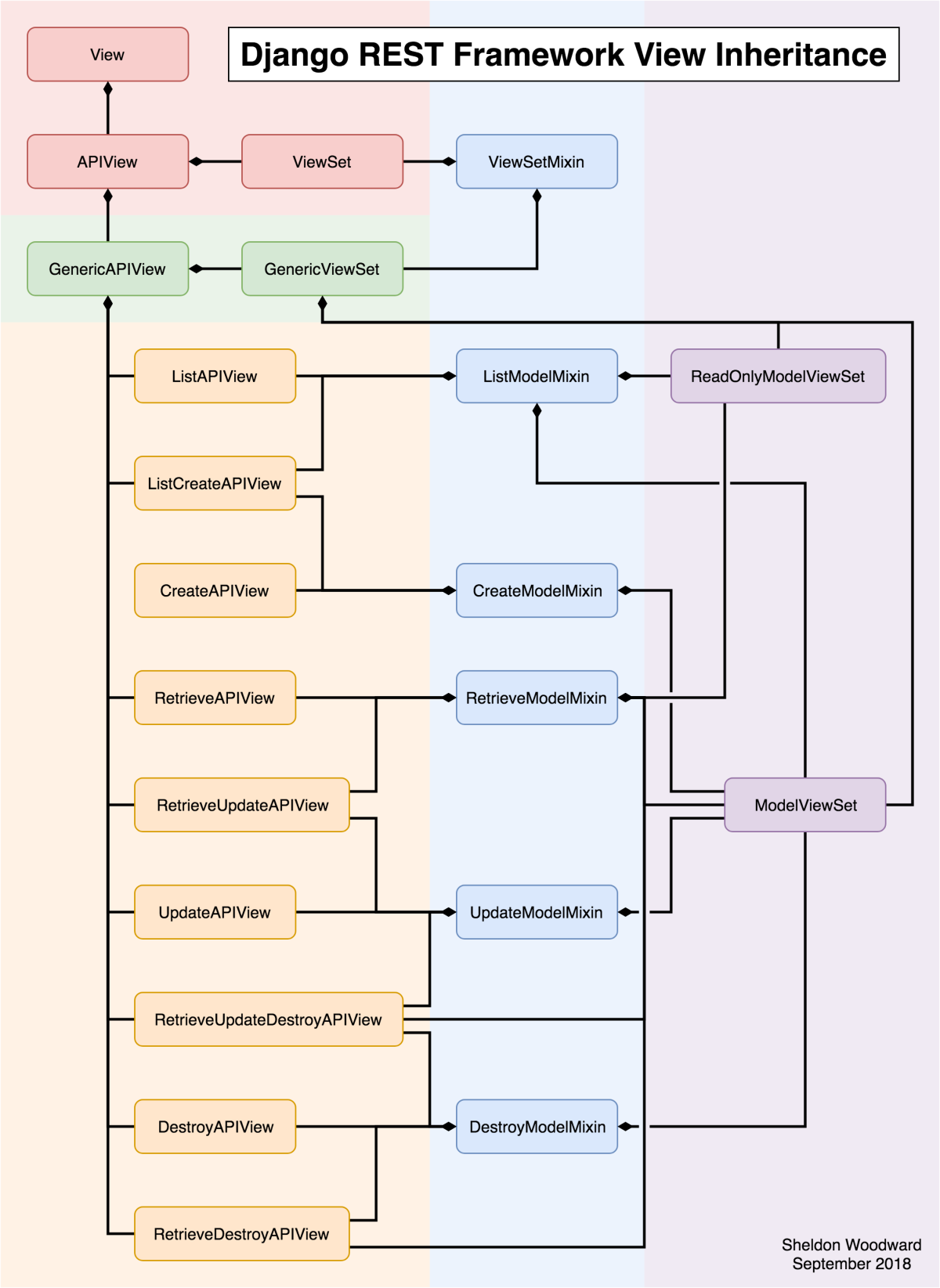
I found a very interesting image on Reddit that shows the DRF class inheritance diagram, which helps us better understand the internal structure of the framework:

Django class inheritance diagram
DRF class inheritance diagram

In the image:

  • On the top, we have Django’s default View class.
  • APIView and ViewSet are DRF classes that inherit from View and bring some specific settings to turn them into APIs, like get() method to handle HTTP GET requests and post() to handle HTTP POST requests.
  • Just below, we have GenericAPIView – which is the base class for generic views – and GenericViewSet – which is the base for ViewSets (the right part in purple in the image).
  • In the middle, in blue, we have the Mixins. They are the code blocks responsible for actually implementing the desired actions.
  • Then we have the Views that provide the features of our API, as if they were Lego blocks. They extend from Mixins to build the desired functionality (whether listing, deleting, etc.)

For example: if you want to create an API that only provides listing of a certain Entity you could choose ListAPIView.

Now if you need to build an API that provides only create and list operations, you could use the ListCreateAPIView.

Now if you need to build an “all-in” API (ie: create, delete, update, and list), choose the ModelViewSet (notice that it extends all available Mixins).

To better understand:

  • Mixins looks like the components of Subway sandwiches 🍅🍞🍗🥩
  • Views are similar to Subway: you assemble your sandwich, component by component 🍞
  • ViewSets are like McDonalds: your sandwich is already assembled 🍔

DRF provides several types of Views and Viewsets that can be customized according to the system’s needs.

To make our life easier, let’s use the ModelViewSet!

In DRF, by convention, we implement Views/ViewSets in the views.py file inside the app in question.

This file is already created when using the django-admin startapp api command, so we don’t need to create it.

Now, see how difficult it is to create a ModelViewSet (don’t be amazed by the complexity):

from api.serializers import ExchangeTradedFundSerializer
from rest_framework import viewsets, permissions
from api.models import ExchangeTradedFund


class ExchangeTradedFundViewSet(viewsets.ModelViewSet):
  queryset = ExchangeTradedFund.objects.all()
  serializer_class = ExchangeTradedFundSerializer
  permission_classes = [permissions.IsAuthenticated]

That’s it!

You might be wondering?

Whoa, and where’s the rest?

All the code for handling Requests, serializing and deserializing objects and formulating HTTP Responses is within the classes that we inherited directly and indirectly.

In our class ExchangeTradedFundViewSet we just need to declare the following parameters:

  • queryset: Sets the base queryset to be used by the API. It is used in the action of listing, for example.
  • serializer_class: Configures which Serializer should be used to consume data arriving at the API and produce data that will be sent in response.
  • permission_classes: List containing the permissions needed to access the endpoint exposed by this ViewSet. In this case, it will only allow access to authenticated users.

With that we kill the third step: the ViewSet!

Now let’s go to the URLs configuration!

Routers

Routers help us generate URLs for our application.

As REST has well-defined patterns of structure of URLs, DRF automatically generates them for us, already in the correct pattern.

So, let’s use it!

To do that, first create the urls.py file in api/urls.py.

Now see how simple it is!

from rest_framework.routers import DefaultRouter
from api.views import ExchangeTradedFundViewSet


app_name = 'api'

router = DefaultRouter(trailing_slash=False)
router.register(r'funds', ExchangeTradedFundViewSet)

urlpatterns = router.urls

Let’s understand:

  • app_name is needed to give context to generated URLs. This parameter specifies the namespace of the added URLConfs.
  • DefaultRouter is the Router we chose for automatic URL generation. The trailing_slash parameter specifies that it is not necessary to use slashes / at the end of the URL.
  • The register method takes two parameters: the first is the prefix that will be used in the URL (in our case: http://localhost:8000/funds) and the second is the View that will respond to the URLs with that prefix.
  • Lastly, we have Django’s urlpatterns, which we use to expose this app’s URLs.

Now we need to add our api app-specific URLs to the project.

To do this, open the etffinder/urls.py file and add the following lines:

from django.contrib import admin
from django.urls import path, include

urlpatterns = [
  path('api/v1/', include('api.urls', namespace='api')),
  path('api-auth/', include('rest_framework.urls', namespace='rest_framework')),
  path('admin/', admin.site.urls),
]

Note: As a good practice, always use the prefix api/v1/ to maintain compatibility in case you need to evolve your api to V2 (api/v2/)!

Using just these lines of code, look at the bunch of endpoints that DRF automatically generated for our API:

URLHTTP MethodAction
/api/v1GETAPI’s root path
/api/v1/backgroundsGETListing of all elements
/api/v1/backgroundsPOSTCreation of new element
/api/v1/backgrounds/{lookup}GETRetrieve element by ID
/api/v1/backgrounds/{lookup}PUTElement Update by ID
/api/v1/backgrounds/{lookup}PATCHPartial update by ID (partial update)
/api/v1/backgrounds/{lookup}DELETEElement deletion by ID
Automatically generated routes.

Here, {lookup} is the parameter used by DRF to uniquely identify an element.

Let’s assume that a Fund has id=ef249e21-43cf-47e4-9aac-0ed26af2d0ce.

We can delete it by sending an HTTP DELETE request to the URL:

http://localhost:8000/api/v1/funds/ef249e21-43cf-47e4-9aac-0ed26af2d0ce

Or we can create a new Fund by sending a POST request to the URL http://localhost:8000/api/v1/funds and the field values ​​in the request body, like this:

{
  "symbol": "SPY",
  "name": "SPDR S&P 500 ETF Trust",
  "asset_class": "Equity",
  "total_assets": "372251000000.00",
  "ytd_price_change": "15.14",
  "average_daily_volume": "69599336"
}

This way, our API would return a HTTP 201 Created code, meaning that an object was created and the response would be:

{
  "id": "a4139c66-cf29-41b4-b73e-c7d203587df9",
  "symbol": "SPY",
  "name": "SPDR S&P 500 ETF Trust",
  "asset_class": "Equity",
  "total_assets": "372251000000.00",
  "ytd_price_change": "15.14",
  "average_daily_volume": "69599336"
}

We can test our URL in different ways: through Python code, through a Frontend (Angular, React, Vue.js) or through Postman, for example.

And how can I see this all running?

So let’s go to the next section!

Browsable interface

One of the most impressive features of DRF is its Browsable Interface.

With it, we can test our API and check its values in a very simple and visual way.

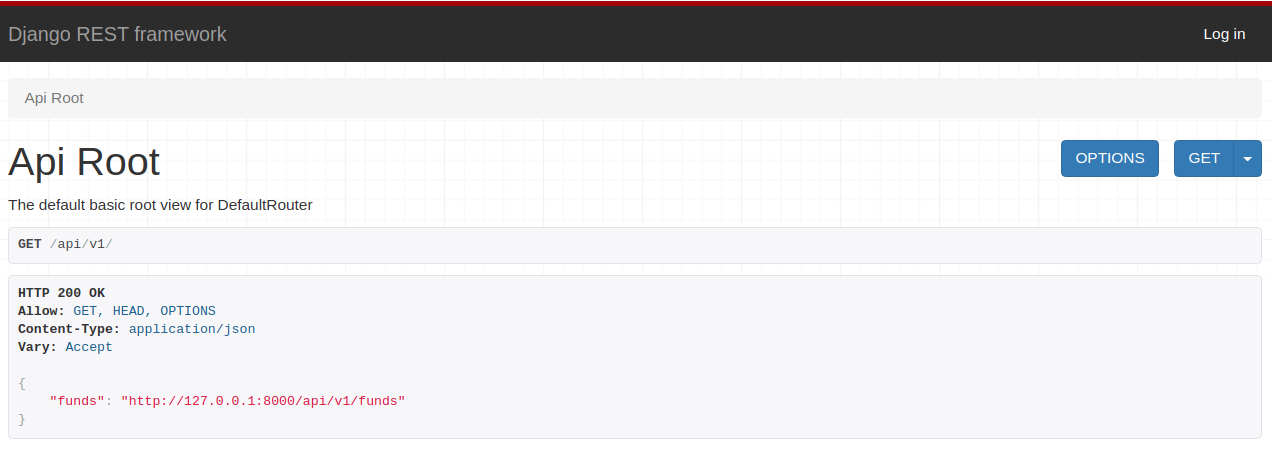
To access it, navigate in your browser to: http://localhost:8000/api/v1.

You should see the following:

DRF Browsable Interface
DRF Browsable Interface – API Root

Go there and click on http://127.0.0.1:8000/api/v1/funds!

The following message must have appeared:

{
  "detail": "Authentication credentials were not provided."
}

Remember the permission_classes setting we used to configure our ExchangeTradedFundViewSet?

It defined that only authenticated users (permissions.isAuthenticated) can interact with the API.

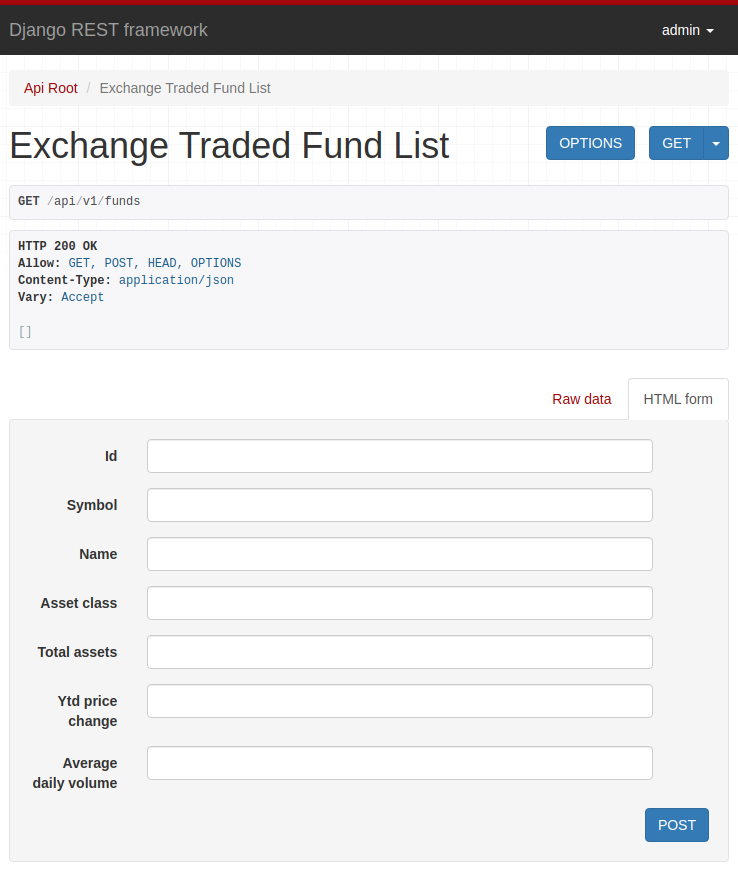
Click on the upper right corner, on “Log in” and use the credentials registered in the createsuperuser command, which we executed at the beginning of the post.

Now, look how this is useful! You should be seeing:

DRF Browsable Interface - ETF Form
DRF Browsable Interface – ETF Form

Play a little, add data and explore the interface.

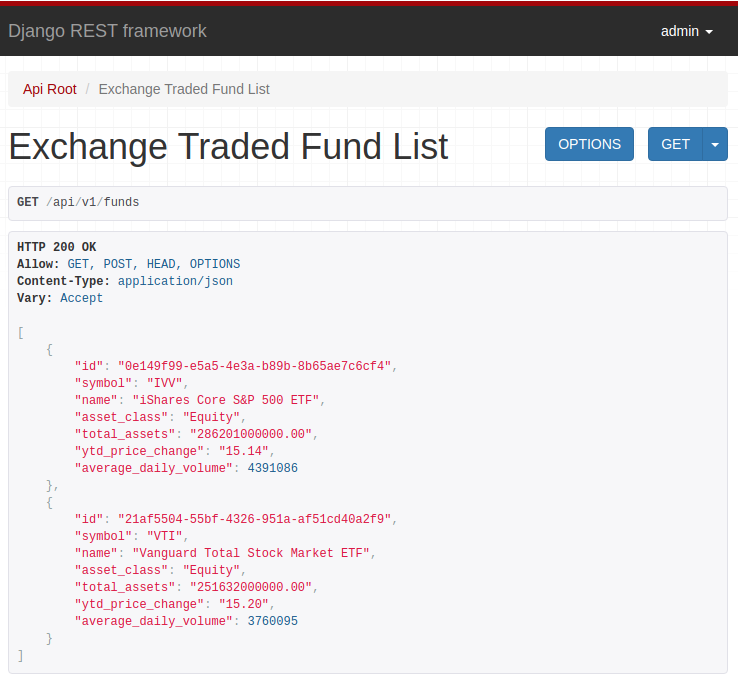
When adding data and updating the page, an HTTP GET API request is triggered, returning the data you just registered:

DRF Browsable Interface - ETF List
DRF Browsable Interface – ETF List

Specific Settings

It is possible to configure various aspects of DRF through some specific settings.

We do this by adding and configuring the REST_FRAMEWORK to the settings.py settings file.

For example, if we want to add pagination to our API, we can simply do this:

REST_FRAMEWORK = {
  'DEFAULT_PAGINATION_CLASS': 'rest_framework.pagination.PageNumberPagination',
  'PAGE_SIZE': 10
}

Now the result of a call, for example, to http://127.0.0.1:8000/api/v1/funds goes from:

[
    {
        "id": "0e149f99-e5a5-4e3a-b89b-8b65ae7c6cf4",
        "symbol": "IVV",
        "name": "iShares Core S&P 500 ETF",
        "asset_class": "Equity",
        "total_assets": "286201000000.00",
        "ytd_price_change": "15.14",
        "average_daily_volume": 4391086
    },
    {
        "id": "21af5504-55bf-4326-951a-af51cd40a2f9",
        "symbol": "VTI",
        "name": "Vanguard Total Stock Market ETF",
        "asset_class": "Equity",
        "total_assets": "251632000000.00",
        "ytd_price_change": "15.20",
        "average_daily_volume": 3760095
    }
]

To:

{
    "count": 2,
    "next": null,
    "previous": null,
    "results": [
        {
            "id": "0e149f99-e5a5-4e3a-b89b-8b65ae7c6cf4",
            "symbol": "IVV",
            "name": "iShares Core S&P 500 ETF",
            "asset_class": "Equity",
            "total_assets": "286201000000.00",
            "ytd_price_change": "15.14",
            "average_daily_volume": 4391086
        },
        {
            "id": "21af5504-55bf-4326-951a-af51cd40a2f9",
            "symbol": "VTI",
            "name": "Vanguard Total Stock Market ETF",
            "asset_class": "Equity",
            "total_assets": "251632000000.00",
            "ytd_price_change": "15.20",
            "average_daily_volume": 3760095
        }
    ]
}

Fields were added to help pagination:

  • count: The amount of returned results;
  • next: The next page;
  • previous: The previous page;
  • results: The current result page.

There are several other very useful settings!

Here are some:

👉 DEFAULT_AUTHENTICATION_CLASSES is used to configure the API authentication method:

REST_FRAMEWORK = {
  ...
  DEFAULT_AUTHENTICATION_CLASSES: [
    'rest_framework.authentication.SessionAuthentication',
    'rest_framework.authentication.BasicAuthentication'
  ]
  ...
}

👉 DEFAULT_PERMISSION_CLASSES is used to set permissions needed to access the API (globally).

REST_FRAMEWORK = {
  ...
  DEFAULT_PERMISSION_CLASSES: ['rest_framework.permissions.AllowAny']
  ...
}

Note: It is also possible to define this configuration per View, using the attribute permissions_classes (which we use in our ExchangeTradedFundViewSet).

👉 DATE_INPUT_FORMATS is used to set date formats accepted by the API:

REST_FRAMEWORK = {
  ...
  'DATE_INPUT_FORMATS': ['%d/%m/%Y', '%Y-%m-%d', '%d-%m-%y', '%d-%m-%Y']
  ...
}

The above configuration will make the API allow the following date formats ’10/25/2006′, ‘2006-10-25′, ’25-10-2006’ for example.

See more settings accessing here the Documentation.